G81 is the standard drilling canned cycle in CNC machining. It drills straight down to your programmed Z depth and retracts in one smooth motion — no pecking, no dwell. It’s the go-to code for shallow holes that don’t need chip-clearing breaks.
Key Takeaways
- G81 performs a simple, one-pass drilling operation with no pecking or dwell
- It’s a modal code — it stays active until you cancel it with G80
- Use G81 for shallow holes; switch to G83 for deep holes that need chip clearing
- The Z value in G81 sets the bottom of the hole, not the start of the cut
- Always pair G81 with G98 or G99 to control where the tool retracts after each hole
| G81 – At A Glance | |
|---|---|
| Function | Standard drilling canned cycle |
| Format | G98/G99 G81 X_ Y_ R_ Z_ F_ |
| Type | Modal (Group 9) |
| Cancelled by | G80 |
| Used with | G98, G99, X, Y, Z, R, F |
What Does G81 Do?
When you call G81, the machine moves to your X/Y position, plunges the spindle to the Z depth you specified, and then retracts. That’s the whole cycle. No stopping at the bottom, no stepping back out in increments.
It’s a modal function, which means once you activate it, it stays active. Every X/Y position you call after G81 will trigger another drill cycle at that same Z depth and feed rate — until you cancel it.
When to Use G81
G81 is the right choice when your hole is shallow enough to drill in one shot. A good rule of thumb: if your hole depth is less than 3x the drill diameter, G81 will usually work without chip buildup.
Common uses include:
- Through holes in thin stock
- Spot drilling to start a hole location
- Center drilling
- Counterboring (with the right tool)
- Reaming and boring shallow holes
If your hole is deeper — say 5x the drill diameter or more — chip packing becomes a real problem. In that case, use G83 (peck drilling with full retract) or G73 (peck drilling with partial retract) instead.
G81 code format
The standard format for G81 is:
G98 G81 X_ Y_ R_ Z_ F_Here’s what each word means:
- G98 or G99 — sets the retract plane (covered below)
- G81 — activates the drilling canned cycle
- XY — hole location in the XY plane
- R — the R plane, the Z position the tool rapids to before feeding into the hole
- Z — the bottom of the drilling motion (not the top of the hole)
- F — feed rate for the drilling pass
Important: In most real programs, the X and Y coordinates are on a separate line before the G81 call. You’ll commonly see it written like this:
X2.0 Y3.0
G98 G81 R0.1 Z-0.75 F12.0
The machine moves to X2.0 Y3.0 first, then the G81 line fires the cycle.
COMMON MISTAKE – Confusing the Z value with the top of the hole
Why it matters: Z in G81 is the bottom of the drilling motion, not where the drill touches the part. If your part surface is at Z0.0 and you want a 0.75″ deep hole, Z should be Z-0.75 — not Z0.75.
Getting this backwards means either a crash or a hole that doesn’t go deep enough.
Working G81 Example
Here’s a short program that drills three holes in a row:
G90 G54 G00 X1.0 Y1.0        (Rapid to first hole position)
G43 H01 Z1.0                  (Tool length comp, Z to initial point)
G98 G81 R0.1 Z-0.75 F12.0    (Drill first hole, retract to Z1.0)
X2.0                          (Second hole — G81 stays active)
X3.0                          (Third hole)
G80                           (Cancel canned cycle)
G00 Z1.0                      (Retract to safe Z)
In this example, G81 stays modal through all three hole locations. The R plane (R0.1) gives the drill a 0.1″ clearance above the part surface before it begins feeding. G98 sends the tool back to Z1.0 (the initial point) after each hole.
COMMON MISTAKE – Forgetting to cancel G81 with G80
Why it matters: G81 is modal. If you don’t cancel it, every X/Y move after it will trigger another drill cycle — including any positioning moves you intended to be rapids. This can drill holes in places you didn’t plan, or worse, plunge into a fixture.
Retract Planes: G98 vs G99
Every G81 call needs either G98 or G99 to tell the machine where to go after each drill cycle.
G98 sends the tool back to the Z position the machine was at when G81 was first called — the initial point. This is the safer option. Use it when there are fixtures, clamps, or raised features between your holes.
G99 sends the tool back to the R plane after each hole. Since the R plane is close to the part surface, this is faster. Use G99 only when you know the path between holes is clear.
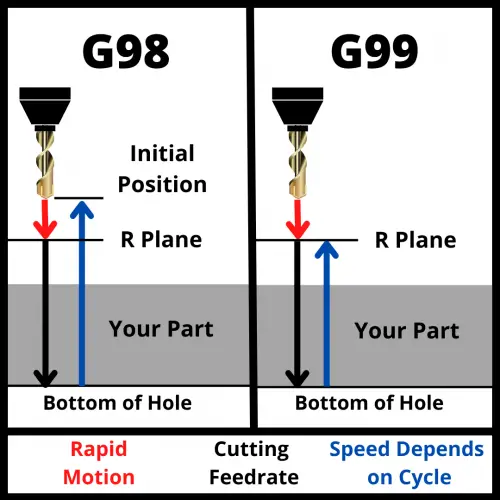
Setting your R plane too low is a common crash source — especially when moving between widely spaced holes. Setting it too high wastes cycle time. A value of 0.1″ above the part surface is a safe starting point for most setups.
COMMON MISTAKE – Using G99 when obstacles exist between holes
Why it matters: G99 retracts only to the R plane, which is just above the workpiece. If there’s a clamp, step, or raised boss between two hole locations, the tool can slam right into it at rapid speed.
Try it yourself to see what can happen
G81 Three-Hole Drill — G98 vs G99 Retract
- G98 is active. The drill returns to the initial point between every hole — well above the clamp.
- Switch to G99 and run to see the crash.
Absolute vs. Incremental Positioning
G81 reads X, Y, Z, and R values based on whatever positioning mode is active — G90 (absolute) or G91 (incremental).
G90 (absolute): All coordinates are measured from the work zero point. This is the standard for most programs.
G91 (incremental): Coordinates are measured from the tool’s current position. This mode is less common but useful for bolt circle patterns or evenly spaced hole patterns.
Double-check your active positioning mode before running a G81 cycle. The wrong mode won’t trigger an alarm — it’ll just drill in the wrong place.
How to Cancel G81
Use G80 to cancel G81 and all other canned cycles. Once G80 is active, the machine returns to normal operation and won’t drill on subsequent XY moves.
You can also cancel G81 by calling a different canned cycle code, which automatically replaces the current one. But using G80 explicitly is cleaner and easier to read.
G81 vs similar Drilling cycles
| Code | Name | Best Used For |
|---|---|---|
| G81 | Standard drilling | Shallow holes, one-pass operations |
| G82 | Spot drilling | Drilling with a dwell at the bottom |
| G83 | Peck drilling (full retract) | Deep holes, full chip clearance |
| G73 | Peck drilling (partial retract) | Moderate depth, faster cycle time |
| G74 | Left-hand tapping | Left-hand threaded holes |
| G85 | Left-hand threaded holes | Precision bore holes, feed in/out |
FAQS
What does G81 do in CNC?
G81 activates the standard drilling canned cycle. It moves the spindle to your programmed X/Y position, feeds down to the Z depth, and retracts — in one pass with no dwell or pecking.
What is the difference between G81 and G83?
G81 drills in one continuous pass, while G83 uses a peck drilling pattern — the drill feeds down a set distance, retracts fully to clear chips, then feeds deeper again. Use G81 for shallow holes and G83 for deep holes where chips could pack and break the drill.
How do you cancel a G81 canned cycle?
Use G80 to cancel G81. Without G80, the cycle stays active and the machine will attempt to drill a hole at every XY position called after the G81 line.
What is the R value in G81?
The R value sets the R plane — the Z height the tool rapids to before feeding into the part. It should be just above your part surface, typically 0.1″ in most setups. The R plane also acts as the retract height when G99 is active.