G73 is a CNC canned cycle for high-speed peck drilling. Instead of plunging in one shot, it drills in small steps — pecking down and retracting slightly between each one. This breaks up chips and keeps the drill from packing up.
Key Takeaways
- G73 drills in incremental steps (pecks) with a short retract between each one
- The short retract breaks chips but doesn’t fully clear the hole — that’s what G83 is for
- Q sets the depth of each peck; the cycle repeats until it reaches the Z depth
- Cancel G73 with G80 or the machine will keep drilling at every XY position in the program
- Use G73 when hole depth is 3–4× the drill diameter or more
| G73 – At A Glance | |
|---|---|
| Function | High-Speed Peck Drilling Cycle |
| Type | Modal / Canned Cycle |
| Cancelled by | G80 |
| Required parameters | X, Y, Z, R, Q, F |
| Optional parameters | K or L (repetitions) |
What Does G73 Do?
G73 is a modal command that puts the machine into a peck drilling cycle. Each time you give it an XY position, it drills to the Z depth in steps — dropping by the Q amount, retracting slightly, then drilling again until it reaches full depth.
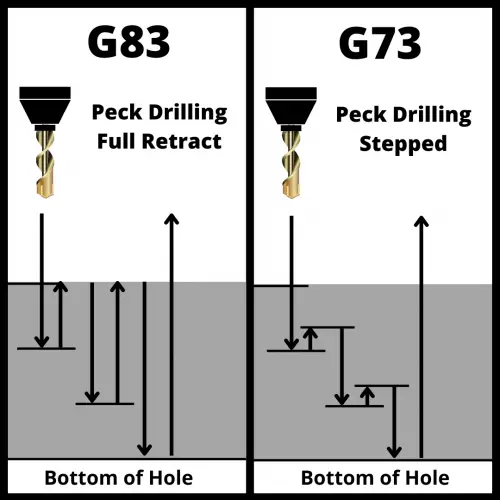
The retract after each peck is just a small amount — enough to break the chip but not enough to pull the drill completely out of the hole. That’s the key difference between G73 and G83.
Difference between peck drilling and standard drilling
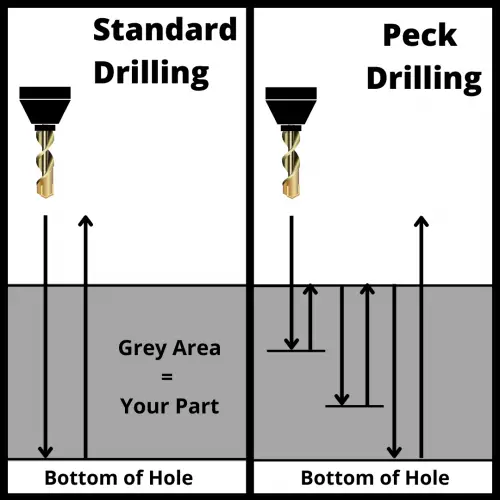
Standard drilling is a straight shot — the drill goes in and comes back out. One move. It works great for shallow through-holes in softer materials.
Peck drilling breaks that into multiple smaller cuts. The drill advances to a set depth (Q), retracts slightly, then advances again. This accomplishes two things: it breaks long stringy chips into shorter pieces, and it keeps chips from packing up in the flutes and causing tool breakage.
Peck Drilling Visualizer — G73 vs G83
- Adjust sliders, then press Run Cycle.
The general rule: if the hole depth is 3 to 4 times greater than the drill diameter, use a peck cycle. Below that ratio, a standard G81 cycle usually handles it fine.
G73 Syntax and Parameters
The basic format for G73 looks like this:
G73 X__ Y__ R__ Z__ Q__ F__ L__Here's what each parameter does:
- X — Hole position in the X axis
- Y — Hole position in the Y axis
- R — The R plane (clearance height). The tool rapids to this Z level before starting each new hole
- Z — Final depth of the hole (where the drill stops)
- Q — Peck depth. How far down the drill advances on each peck. This is an incremental value
- F — Feedrate in inches per minute (or mm/min). Depends on your material and drill diameter
- K or L — Number of times to repeat the cycle at the same position (machine dependent — check your control manual)
COMMON MISTAKE - Leaving Q out of the G73 block
Why it matters: On most controls, omitting Q causes an alarm or the machine drills to full depth in a single pass — defeating the whole point of the peck cycle. Always specify Q.
G73 Program Example
Here's a realistic G73 program:
G90 G54 G00 X1.0 Y1.0         (Rapid to first hole)
G43 H01 Z1.0 M03 S1200        (Tool length comp, spindle on)
G73 X1.0 Y1.0 R0.1 Z-1.5 Q0.25 F8.0  (Peck drill — 0.25" pecks to 1.5" depth)
X2.5 Y1.0                     (Second hole — G73 still active)
X4.0 Y1.0                     (Third hole)
G80                            (Cancel canned cycle)
G91 G28 Z0                    (Return Z to home)
M05                            (Spindle off)
In this example, the drill will take six pecks of 0.25" to reach the 1.5" depth, with a short retract between each one.
COMMON MISTAKE - Not canceling G73 with G80 before moving to a new operation
Why it matters: G73 is modal. If you forget G80, the control will try to peck drill at the next XY coordinate you program — even if that move was intended for something else entirely.
How to cancel a G73 code?
Use G80 to cancel G73 and all other canned cycles. Once G80 is active, XY moves return to normal rapids or linear moves.
You can also cancel a canned cycle by calling a different canned cycle code — but G80 is the clean, explicit way to do it.
G73 on a Lathe vs. a Mill
G73 means something completely different on a CNC lathe. On a lathe, G73 is a pattern repeating cycle — the machine cuts the same profile multiple times, stepping in toward the finished dimension on each pass. It's used for turning rough stock down to shape.
If you're programming a lathe and see G73, don't confuse it with peck drilling. Always check whether you're working on a mill or a lathe.
When to Use G73
G73 is a good choice when:
- Hole depth is 3–4× the diameter or more — deeper holes accumulate chips fast
- You're drilling in a material that makes long, stringy chips — aluminum and some steels are notorious for this
- Cycle time matters — because G73 only retracts slightly, it's faster than G83
G73 is not the right choice when:
- You need to fully clear chips from the hole (use G83 instead)
- You're drilling very deep holes where chip buildup is severe
G73 vs. G83: Which One Should You Use?
Both G73 and G83 are peck drilling cycles. The difference is how far the tool retracts after each peck.
G73 retracts just enough to break the chip — the tool stays inside the hole. G83 retracts all the way out to the R plane — fully clearing chips from the hole on every peck.
| G73 | G83 | |
|---|---|---|
| Retract per peck | Short (chip break only) | Full retract to R plane |
| Best for | Moderate depth, stringy chips | Deep holes, heavy chip load |
| Cycle time | Faster | Slower |
| Chip clearance | Partial | Complete |
Use G73 when the material makes manageable chips and you want speed. Use G83 when you're drilling deep and need to fully evacuate chips between pecks.
G73 vs Drilling Cycles
| Code | Name | When to Use |
|---|---|---|
| G81 | Standard Drilling | Simple through-holes, no peck needed |
| G82 | Spot Drilling | Drilling with a dwell at the bottom |
| G83 | Deep Hole Peck Drilling | Deep holes, full chip clearance required |
| G73 | High-Speed Peck Drilling | Moderate depth, faster cycle time |
FAQs
What is G73 used for in CNC machining?
G73 is a canned cycle for high-speed peck drilling. It drills a hole in multiple steps, retracting slightly after each peck to break chips. It's used when hole depth is 3–4 times the drill diameter or greater.
What is the difference between G73 and G83?
Both are peck drilling cycles, but G73 only retracts a short distance after each peck to break the chip. G83 retracts all the way to the R plane, fully clearing chips from the hole. G83 is better for deeper holes with heavier chip loads; G73 is faster.
How do you cancel a G73 canned cycle?
Use G80 to cancel G73 and all other canned cycles. If G73 is not canceled with G80, the machine will continue peck drilling at every XY position that follows in the program.
What does Q do in a G73 cycle?
Q sets the peck depth — how far the drill advances on each individual pass before retracting. For example, Q0.25 means the drill pecks 0.25 inches at a time until it reaches the programmed Z depth.